50k
50k

Introduction
Auto-scaling database resources requires careful balance: scale up too slowly and you risk performance degradation; scale down too aggressively and you trigger constant oscillations. Our auto-scaling system used a single 30-hour lookback window to make scaling decisions. This made scale-ups fast and stable, but it meant scale-downs were conservative by design. After traffic dropped, a cluster could take up to 30 hours to right-size.
This post explores how we solved this problem with a two-window recommender: a dual-window approach that scales up aggressively and scales down faster. We paired this two-window framework with a new target-tracking CPU recommendation system, replacing our previous CPU recommendation algorithm that didn't work well with multiple windows.
The result: significantly faster scale-downs, minimized scaling oscillations, and substantial infrastructure cost reduction for variable workloads, all while maintaining the stability needed for production databases.
Note: This post focuses on vertical auto-scaling, adjusting CPU and memory per replica. For horizontal scaling options and user-facing configuration, see the ClickHouse Cloud scaling documentation.
The Problem: Long Lookback Windows
Our original auto-scaling system used a 30-hour lookback window to determine resource recommendations. This approach had clear benefits:
- Fast scale-up: When usage spiked, we'd see it immediately and scale up
- Stability: The long window prevented reacting to transient fluctuations
However, it created a critical problem for scale-downs:
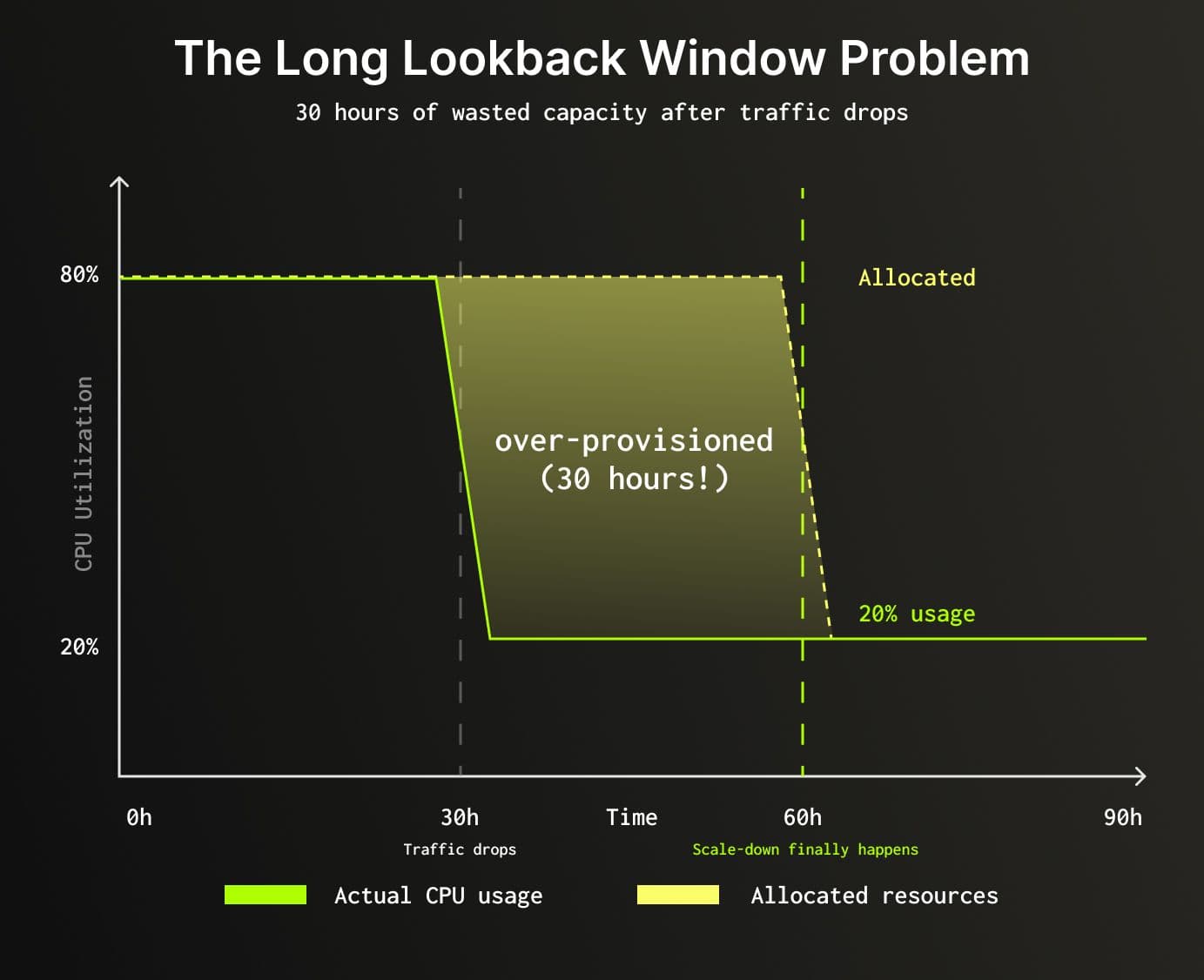
Result: 30 hours of over-provisioned resources after traffic dropped, increasing infrastructure spend more than necessary.
Key metric: The system tracks peak (maximum) usage within the lookback period rather than average usage. Provisioning based on averages would leave insufficient capacity during peak moments, leading to query failures or degraded performance.
We needed a way to keep the fast, stable scale-ups while making scale-downs significantly faster.
The Two-Window Solution
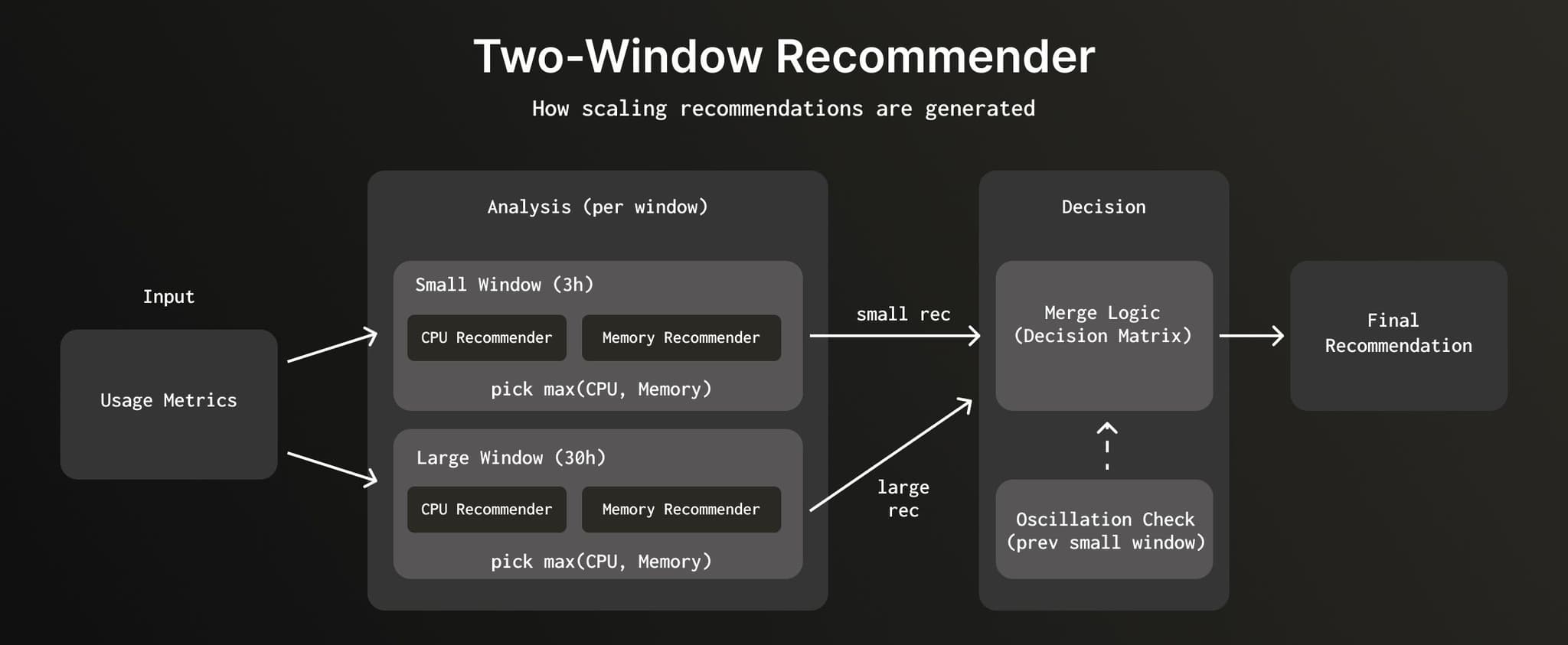
Instead of using a single window, we use two lookback windows with different time ranges:
- Small Window (3 hours): Captures recent usage patterns, enables faster scale-down
- Large Window (30 hours): Ensures we scale up in a single step to the maximum usage seen in the longer lookback window, rather than multiple gradual scale-ups. This is critical because scaling takes time and invalidates local caches; so it is safer to scale up in a single step.
We explored various short window durations before settling on 3 hours. A 1-hour window was too reactive; it scaled down too aggressively and caused oscillations. A 6-hour window didn't improve scale-down latency enough. Three hours struck the right balance between responsiveness and stability.
Each window independently generates a recommendation using both memory and CPU analysis. The system then merges these recommendations based on the scaling direction each window suggests.
Generating recommendations per window
The system generates recommendations for both windows in parallel:
- Small window (3 hours): Analyzes recent maximum usage patterns
- Large window (30 hours): Analyzes historical maximum usage patterns
- Previous small window: Fetches the last small window recommendation for trend detection
For each window, the system runs both memory-based and CPU-based analysis in parallel, then selects whichever recommends more resources (since CPU and memory scale in a fixed 1:4 ratio, this covers both dimensions). Each window's recommendation is then compared to the current allocation to determine the scaling direction: scale-up if it recommends more, scale-down if it recommends less, or no change.
Merging the recommendations
Since each window looks at a different time range, they can reach different conclusions. The small window might see that traffic has been calm for the past 3 hours and recommend scaling down, while the large window still remembers yesterday's spike and wants to hold steady, or even scale up. The question becomes: when they disagree, which one do we pick?
| Large Window | Small Window | Picked Recommendation | Reasoning |
|---|---|---|---|
| Scale-up | Scale-up | Large window | Single-step scale to longer-term peak |
| Scale-up | No change | Small window | Recent usage is stable, don't scale yet |
| Scale-up | Scale-down | Hunting check | If small window trending up, use large to avoid hunting; else use small |
| No change | Scale-up | — | Not possible (large window contains small window data) |
| No change | No change | Small window | No change |
| No change | Scale-down | Hunting check | If small window trending up, use large to avoid hunting; else use small |
| Scale-down | Scale-up | — | Not possible (large window contains small window data) |
| Scale-down | No change | Large window | Service likely idling/stopped |
| Scale-down | Scale-down | Small window | Faster scale-down |
When both windows agree on direction, we pick the small window for scale-downs (faster) and the large window for scale-ups (single-step to peak). When they disagree, we run a hunting check. Some cases are simply not possible because the large window completely overlaps the small window.
Preventing hunting
To prevent hunting, the system uses the previous small window recommendation. When windows disagree (large wants scale-up but small wants scale-down), the system checks if the small window recommendation is trending upward.
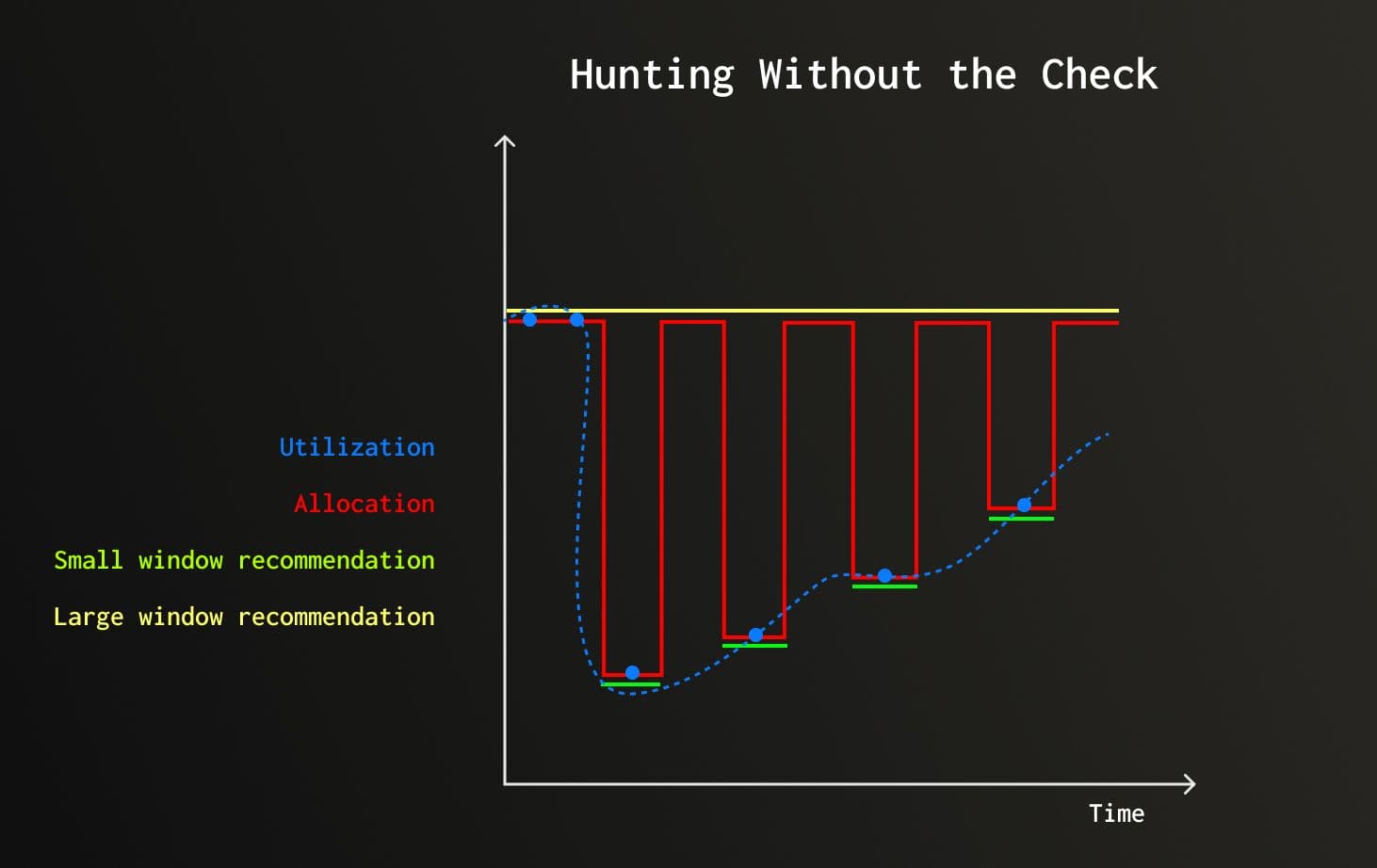
Illustrative example: After high CPU usage subsides, actual utilization (blue dots) drops then starts rising slowly. The large window (yellow) holds its recommendation steady. The small window (green) drops fast after the spike. Without the hunting check, the two-window merge logic would alternate between trusting each window, producing the red line, hunting between scale-down and scale-up. The hunting check prevents this by trusting the large window whenever the small window is trending upward.
Hunting check: current_small_window > previous_small_window
- If trending up: Trust large window (usage is rising, prevents hunting and scale in single step rather than gradually)
- If stable/down: Trust small window (safe to scale down)
With the two-window framework in place, we needed CPU and memory recommenders to generate proposals for each window. But our existing CPU recommender, which used fixed scaling factors, had problems that the two-window approach made significantly worse.
The Fixed-Factor CPU Scaling Problem
Our original CPU recommender used a threshold-based approach:
if utilization > 75%: scale to 2× current recommendation
if utilization < 37.5%: scale to 0.5× current recommendation
otherwise: no changeThis created two major issues when used with the two-window approach:
Cascading scale-ups across windows
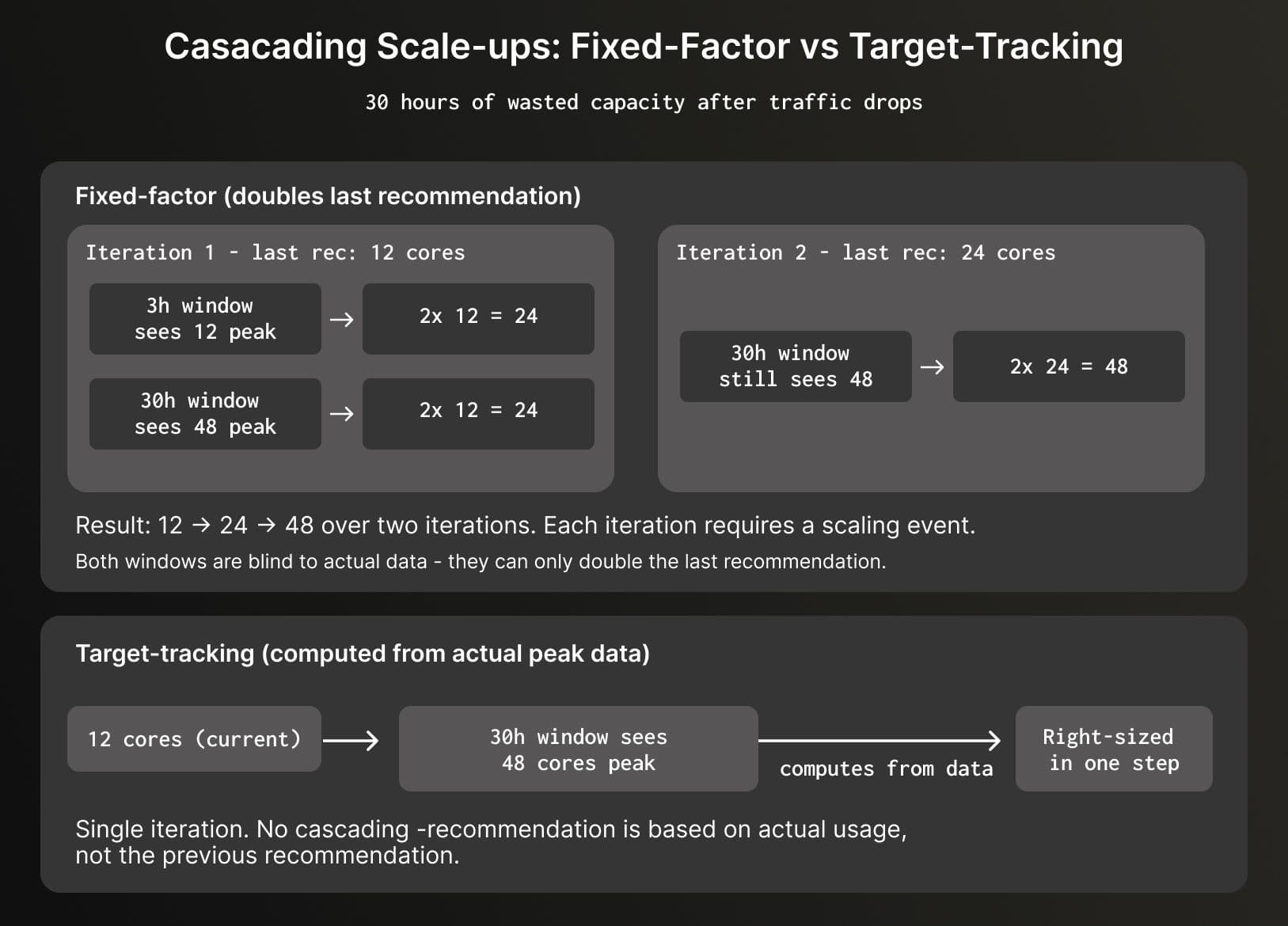
The fixed-factor algorithm could only double or halve the last recommendation; it couldn't calculate directly from the actual peak usage data. With two windows running in parallel, this meant even when the 30-hour window could see a large peak, it couldn't jump to the right size in one step.
For example, imagine a service that peaked at 48 cores yesterday but has since dropped to 12 cores:
Oscillations with shorter windows
With shorter windows, the 2x scaling factor created severe oscillations:
Hour 0: 50 cores allocated, 40 cores used (80%) → Scale to 100 cores
Hour 3: 40 cores used / 100 allocated (40%) → Scale to 50 cores
Hour 6: 40 cores used / 50 allocated (80%) → Scale to 100 cores
Hour 9: Repeat...Result: Constant scaling disruptions every few hours, with minor usage changes.
We needed an approach that scales based on actual usage, not previous recommendations.
Target-Tracking CPU Recommendation
To solve these problems, we replaced the fixed-factor algorithm with target-tracking. Target-tracking scales capacity based on a target utilization metric. Instead of doubling or halving allocations, it calculates the exact resources needed to maintain the target utilization level.
How target-tracking works
The algorithm calculates a threshold band based on current allocation and watermarks. Scaling only occurs when peak usage falls outside this band:
min_threshold = current_allocation × low_watermark
max_threshold = current_allocation × high_watermark
if peak_usage outside [min_threshold, max_threshold]:
new_allocation = peak_usage ÷ target_utilization
else:
maintain current_allocation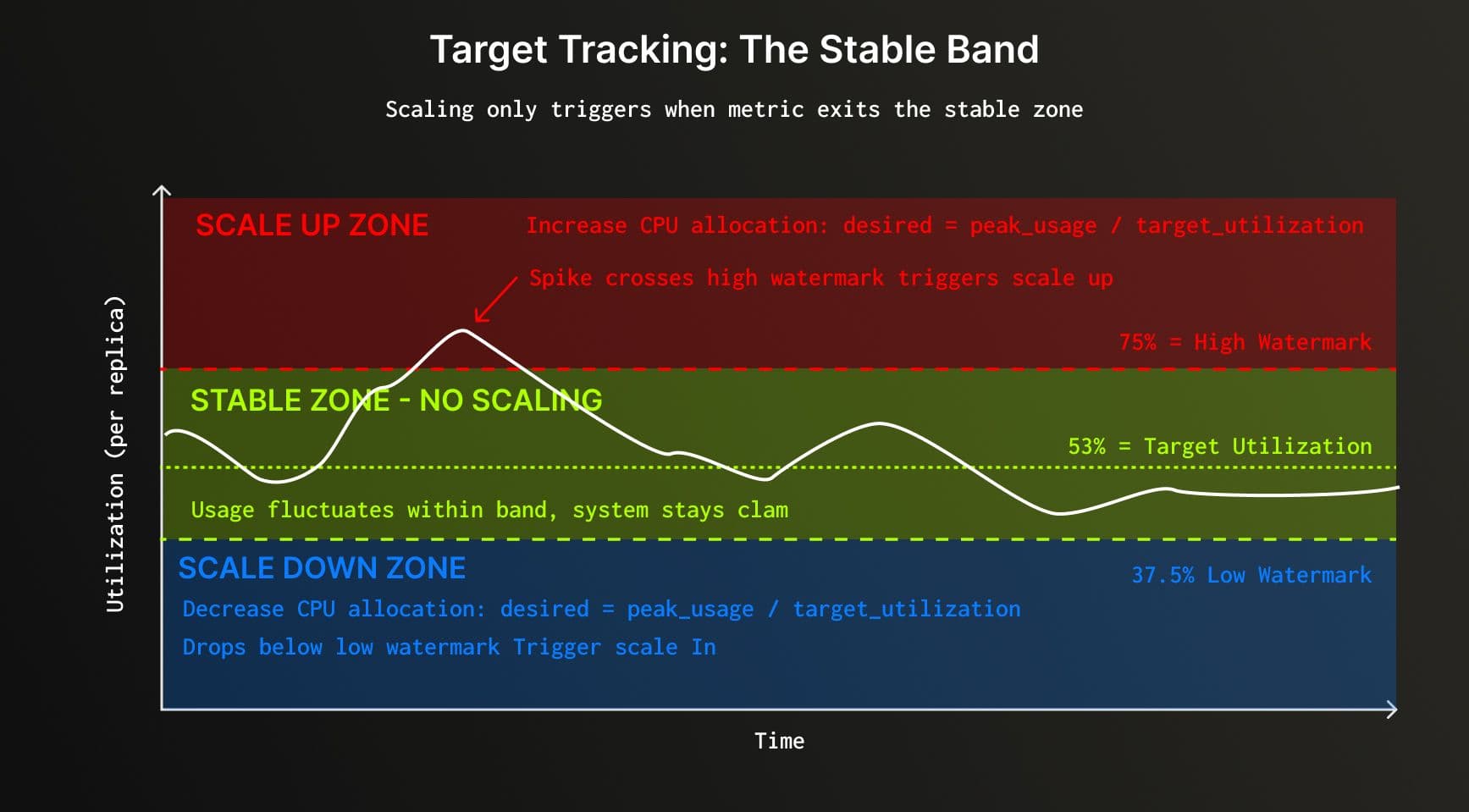
The algorithm scales to achieve target utilization, creating a stable band where usage can fluctuate around the target without triggering another scaling event. In our current implementation, target utilization is the geometric mean of the watermarks.
Why geometric mean? Ensuring reversible scaling
The target utilization is set to the geometric mean of the watermarks:
target_utilization = √(high_watermark × low_watermark)
# Example: √(0.75 × 0.375) = √0.28125 = 0.53This ensures reversible scaling: if usage returns to the same value, allocation returns to the same value.
Start: 100 cores, 80 cores usage
Scale up to: 80 / 0.53 = 151 cores
Later, usage drops back to 80 cores:
With 151 cores: 80 / 151 = 53% (within thresholds, no change)
If usage later spikes to 120 cores:
Calculate: 120 / 0.53 = 226 cores
If usage returns to 80 cores again:
With 226 cores: 80 / 226 = 35.4% (below 37.5% low watermark)
Scale to: 80 / 0.53 = 151 cores (same as before!)Using the geometric mean for target utilization provides important mathematical guarantees:
- reversible scaling (same usage returns to same allocation)
- balanced headroom in both directions
- prevention of allocation drift over time.
Smoothing out transient spikes
To avoid reacting to transient spikes, the system smooths CPU usage using a 10-minute rolling window of median values calculated per replica. This filters out short-lived spikes while preserving genuine sustained increases. The system then takes the maximum of these smoothed values across all replicas as the peak usage.
Target-tracking solved the CPU side. But CPU is only half the picture, each window also needs a memory-based recommendation.
Memory-Based Recommendation
Like the CPU recommender, each window also generates a memory-based recommendation. The memory recommender tracks multiple signals like query memory, resident memory, and OOM events (both ClickHouse-managed and container-level) and applies usage-based multipliers to ensure sufficient headroom.
For each window, both CPU and memory recommendations are generated independently, and the system selects whichever recommends more resources. Since ClickHouse Cloud maintains a fixed 1 CPU core to 4 GB memory ratio, CPU and memory scale together in lockstep.
For details on memory signals, skew-based multipliers, and the recommendation formula, see the scaling documentation.
The two-window recommender with target-tracking optimizes resource allocation during active usage. But what about services that go completely quiet?
Automatic Idling
While the two-window recommender optimizes resource allocation during active usage, ClickHouse Cloud also provides automatic idling as a separate cost-optimization feature for periods of complete inactivity.
Key distinction: Auto-scaling adjusts resources based on usage patterns during active periods, while automatic idling completely pauses services when they receive no queries for a configured duration.
When a service idles, compute resources are suspended (no billing for CPU/memory) while data remains intact in storage. The service automatically resumes when a new query arrives. ClickHouse Cloud also implements adaptive idling: smart logic that prevents idling when background merges are needed or service initialization times warrant longer timeouts.
For complete details on automatic idling, configuration options, use cases, and adaptive behavior, see the Automatic Idling documentation.
Conclusion
The two-window recommender with target-tracking CPU scaling has delivered significant improvements: scale-down latency reduced from 30 hours to 3 hours, oscillation issues minimized, cascading over-provisioning resolved, and substantial infrastructure cost reduction for variable workloads.
The key insight is that different time windows excel at different tasks: short windows for responsive scale-down, long windows for stable scale-up decisions. By merging recommendations from both windows, we get the best of both worlds.
Together with memory-based recommendations and idling, these changes have made our ClickHouse auto-scaling system faster, more stable, and more cost-efficient, enabling our customers to run production workloads with confidence. The two-window recommender and target-tracking algorithm provide a strong foundation, and we're continuing to refine our scaling algorithms to match allocation even more closely to actual utilization.
Get started today
Interested in seeing how ClickHouse works on your data? Get started with ClickHouse Cloud in minutes and receive $300 in free credits.
Sign up