前提条件
要完成本文中的示例,您需要:
- 一个正在运行的 ClickHouse 服务器实例
- 已安装
curl。在 Ubuntu 或 Debian 上,运行 sudo apt install curl,或参考此文档获取安装说明。
HTTP 接口允许你在任何平台上、使用任何编程语言,以 REST API 的形式访问 ClickHouse。与原生接口相比,HTTP 接口功能更有限,但具备更好的语言支持。
默认情况下,clickhouse-server 监听以下端口:
- 端口 8123 用于 HTTP
- 端口 8443 用于 HTTPS(可启用)
如果在没有任何参数的情况下发起 GET / 请求,则会返回 200 响应码以及字符串 "Ok.":
$ curl 'http://localhost:8123/'
Ok.
"Ok." 是在 http_server_default_response 中定义的默认值,如有需要可以修改。
另请参阅:HTTP 响应码注意事项。
Web 用户界面
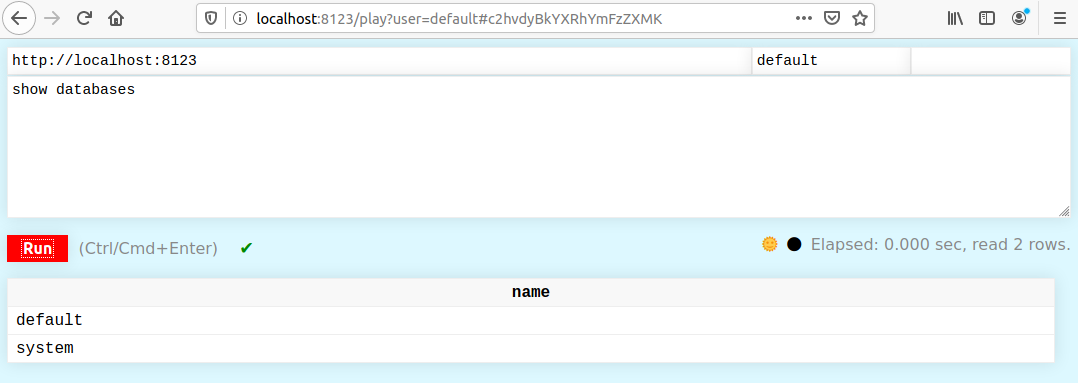
ClickHouse 提供一个 Web 用户界面,可以通过以下地址访问:
http://localhost:8123/play
Web UI 支持在查询运行期间显示进度、取消查询以及结果流式传输。
它还具有一个隐藏特性,用于显示查询管道的图表和可视化结果。
成功执行查询后,会出现一个下载按钮,允许你以多种格式下载查询结果,包括 CSV、TSV、JSON、JSONLines、Parquet、Markdown,或 ClickHouse 支持的任意自定义格式。下载功能使用查询缓存高效地获取结果,而无需重新执行查询。即使 UI 仅显示了多页结果中的一页,它也会下载完整的结果集。
Web UI 专为像你这样的专业人士设计。
在健康检查脚本中使用 GET /ping 请求。此处理器始终返回 “Ok.”(末尾带有换行符)。从 18.12.13 版本开始可用。另请参阅 /replicas_status 以检查副本延迟。
$ curl 'http://localhost:8123/ping'
Ok.
$ curl 'http://localhost:8123/replicas_status'
Ok.
通过 HTTP/HTTPS 进行查询
要通过 HTTP/HTTPS 进行查询,有三种方式:
- 将请求作为 URL 的
query 参数发送
- 使用 POST 方法
- 在
query 参数中发送查询的开头部分,其余部分通过 POST 发送
注意
URL 的大小默认限制为 1 MiB,可以通过 http_max_uri_size setting 进行修改。
如果执行成功,将返回 200 响应码,结果包含在响应体中。
如果发生错误,将返回 500 响应码,错误描述文本包含在响应体中。
使用 GET 的请求是 readonly 的。这意味着对数据有修改的查询只能使用 POST 方法。
查询本身可以放在 POST 请求体中,或者放在 URL 参数中。下面来看一些示例。
在下面的示例中,使用 curl 发送查询 SELECT 1。注意 URL 编码中对空格的处理:%20。
curl 'http://localhost:8123/?query=SELECT%201'
在此示例中,使用 wget 命令搭配 -nv(non-verbose,非详细模式)和 -O- 参数将结果输出到终端。
在这种情况下,无需对空格进行 URL 编码:
wget -nv -O- 'http://localhost:8123/?query=SELECT 1'
在此示例中,我们通过管道将原始 HTTP 请求传递给 netcat:
echo -ne 'GET /?query=SELECT%201 HTTP/1.0\r\n\r\n' | nc localhost 8123
HTTP/1.0 200 OK
X-ClickHouse-Summary: {"read_rows":"1","read_bytes":"1","written_rows":"0","written_bytes":"0","total_rows_to_read":"1","result_rows":"0","result_bytes":"0","elapsed_ns":"4505959","memory_usage":"1111711"}
Date: Tue, 11 Nov 2025 18:16:01 GMT
Connection: Close
Content-Type: text/tab-separated-values; charset=UTF-8
Access-Control-Expose-Headers: X-ClickHouse-Query-Id,X-ClickHouse-Summary,X-ClickHouse-Server-Display-Name,X-ClickHouse-Format,X-ClickHouse-Timezone,X-ClickHouse-Exception-Code,X-ClickHouse-Exception-Tag
X-ClickHouse-Server-Display-Name: MacBook-Pro.local
X-ClickHouse-Query-Id: ec0d8ec6-efc4-4e1d-a14f-b748e01f5294
X-ClickHouse-Format: TabSeparated
X-ClickHouse-Timezone: Europe/London
X-ClickHouse-Exception-Tag: dngjzjnxkvlwkeua

1
如前所示,curl 命令有些不便,因为空格必须进行 URL 转义。
虽然 wget 会自动对所有内容进行转义,但我们不建议使用它,因为在使用 keep-alive 和 Transfer-Encoding: chunked 时,它在 HTTP/1.1 下的表现并不好。
$ echo 'SELECT 1' | curl 'http://localhost:8123/' --data-binary @-
1

$ echo 'SELECT 1' | curl 'http://localhost:8123/?query=' --data-binary @-
1

$ echo '1' | curl 'http://localhost:8123/?query=SELECT' --data-binary @-
1
如果查询的一部分作为参数发送,另一部分通过 POST 发送,那么系统会在这两段数据之间插入一个换行符。
例如,下面这样将无法工作:
$ echo 'ECT 1' | curl 'http://localhost:8123/?query=SEL' --data-binary @-
Code: 59, e.displayText() = DB::Exception: Syntax error: failed at position 0: SEL
ECT 1
, expected One of: SHOW TABLES, SHOW DATABASES, SELECT, INSERT, CREATE, ATTACH, RENAME, DROP, DETACH, USE, SET, OPTIMIZE., e.what() = DB::Exception
默认情况下,数据会以 TabSeparated 格式返回。
在查询中可以使用 FORMAT 子句来请求任意其他格式。例如:
wget -nv -O- 'http://localhost:8123/?query=SELECT 1, 2, 3 FORMAT JSON'
{
    "meta":
    [
        {
            "name": "1",
            "type": "UInt8"
        },
        {
            "name": "2",
            "type": "UInt8"
        },
        {
            "name": "3",
            "type": "UInt8"
        }
    ],

    "data":
    [
        {
            "1": 1,
            "2": 2,
            "3": 3
        }
    ],

    "rows": 1,

    "statistics":
    {
        "elapsed": 0.000515,
        "rows_read": 1,
        "bytes_read": 1
    }
}
你可以使用 default_format URL 参数或 X-ClickHouse-Format 请求头来指定 TabSeparated 以外的默认格式。
$ echo 'SELECT 1 FORMAT Pretty' | curl 'http://localhost:8123/?' --data-binary @-
┏━━━┓
┃ 1 ┃
┡━━━┩
│ 1 │
└───┘
可以使用 POST 方法执行参数化查询。参数使用花括号包裹参数名称和类型来指定,例如 {name:Type}。参数值通过 param_name 传递:
$ curl -X POST -F 'query=select {p1:UInt8} + {p2:UInt8}' -F "param_p1=3" -F "param_p2=4" 'http://localhost:8123/'

7
通过 HTTP/HTTPS 执行 INSERT 查询
在执行 INSERT 查询时,必须使用 POST 方法来传输数据。在这种情况下,可以在 URL 参数中写入查询的开头部分,并使用 POST 传递要插入的数据。要插入的数据可以是例如来自 MySQL 的制表符分隔转储数据。通过这种方式,INSERT 查询可以替代 MySQL 中的 LOAD DATA LOCAL INFILE 语句。
要创建一张表:
$ echo 'CREATE TABLE t (a UInt8) ENGINE = Memory' | curl 'http://localhost:8123/' --data-binary @-
要使用熟悉的 INSERT 查询来插入数据:
$ echo 'INSERT INTO t VALUES (1),(2),(3)' | curl 'http://localhost:8123/' --data-binary @-
要将数据与查询单独发送:
$ echo '(4),(5),(6)' | curl 'http://localhost:8123/?query=INSERT%20INTO%20t%20VALUES' --data-binary @-
可以指定任意数据格式。例如,可以指定 'Values' 格式,该格式与执行 INSERT INTO t VALUES 时使用的格式相同:
$ echo '(7),(8),(9)' | curl 'http://localhost:8123/?query=INSERT%20INTO%20t%20FORMAT%20Values' --data-binary @-
要从制表符分隔的转储文件中插入数据,请指定相应的格式:
$ echo -ne '10\n11\n12\n' | curl 'http://localhost:8123/?query=INSERT%20INTO%20t%20FORMAT%20TabSeparated' --data-binary @-
要读取表内容:
$ curl 'http://localhost:8123/?query=SELECT%20a%20FROM%20t'
7
8
9
10
11
12
1
2
3
4
5
6
要删除该表:
$ echo 'DROP TABLE t' | curl 'http://localhost:8123/' --data-binary @-
对于未返回数据表的成功请求,响应体为空。
在传输大量数据或创建同时压缩的转储时,可以使用压缩来减少网络流量。
在传输数据时,可以使用 ClickHouse 的内部压缩格式。压缩后的数据采用非标准格式,需要使用 clickhouse-compressor 程序进行处理。该程序会随 clickhouse-client 包默认安装。
为提高数据插入效率,可以通过 http_native_compression_disable_checksumming_on_decompress 设置禁用服务端的校验和检查。
如果在 URL 中指定 compress=1,服务器会压缩返回给你的数据。如果在 URL 中指定 decompress=1,服务器会解压你通过 POST 方法传入的数据。
你也可以选择使用 HTTP compression。ClickHouse 支持以下压缩方法:
gzipbrdeflatexzzstdlz4bz2snappy
要发送压缩的 POST 请求,请添加请求头 Content-Encoding: compression_method。
为了让 ClickHouse 压缩响应,请在请求中添加 Accept-Encoding: compression_method 头。
你可以使用 http_zlib_compression_level 为所有压缩方法配置数据压缩级别。
信息
某些 HTTP 客户端可能会默认解压来自服务器的数据(使用 gzip 和 deflate),因此即使你正确使用了压缩设置,仍可能得到已解压的数据。
要向服务器发送压缩数据:
echo "SELECT 1" | gzip -c | \
curl -sS --data-binary @- -H 'Content-Encoding: gzip' 'http://localhost:8123/'
要从服务器接收压缩数据归档:
curl -vsS "http://localhost:8123/?enable_http_compression=1" \
-H 'Accept-Encoding: gzip' --output result.gz -d 'SELECT number FROM system.numbers LIMIT 3'

zcat result.gz
0
1
2
若要从服务器接收压缩数据,并使用 gunzip 在本地解压:
curl -sS "http://localhost:8123/?enable_http_compression=1" \
-H 'Accept-Encoding: gzip' -d 'SELECT number FROM system.numbers LIMIT 3' | gunzip -
0
1
2
默认数据库
你可以使用 database URL 参数或 X-ClickHouse-Database 头部来指定默认数据库。
echo 'SELECT number FROM numbers LIMIT 10' | curl 'http://localhost:8123/?database=system' --data-binary @-
0
1
2
3
4
5
6
7
8
9
默认情况下,服务器设置中注册的数据库会被用作默认数据库。默认安装中,该数据库名为 default。另外,你也可以始终通过在表名前加上“数据库名.”(例如 mydb.mytable)来显式指定要使用的数据库。
身份验证
可以通过以下三种方式之一指定用户名和密码:
- 使用 HTTP 基本身份验证。
例如:
echo 'SELECT 1' | curl 'http://user:password@localhost:8123/' -d @-
- 在
user 和 password URL 参数中
注意
我们不建议使用此方法,因为这些参数可能会被 Web 代理记录,并缓存在浏览器中
例如:
echo 'SELECT 1' | curl 'http://localhost:8123/?user=user&password=password' -d @-
- 使用 'X-ClickHouse-User' 和 'X-ClickHouse-Key' 请求头
例如:
echo 'SELECT 1' | curl -H 'X-ClickHouse-User: user' -H 'X-ClickHouse-Key: password' 'http://localhost:8123/' -d @-
如果未指定用户名,则使用 default 作为名称。如果未指定密码,则使用空密码。
还可以使用 URL 参数为单个查询或整个设置概要配置文件指定任意设置。
例如:
http://localhost:8123/?profile=web&max_rows_to_read=1000000000&query=SELECT+1
$ echo 'SELECT number FROM system.numbers LIMIT 10' | curl 'http://localhost:8123/?' --data-binary @-
0
1
2
3
4
5
6
7
8
9
有关更多信息,参见:
在 HTTP 协议中使用 ClickHouse 会话
您也可以在 HTTP 协议中使用 ClickHouse 会话。为此,需要在请求中添加 session_id 这一 GET 参数。您可以使用任意字符串作为会话 ID。
默认情况下,会话在 60 秒不活动后终止。要更改此超时时间(单位为秒),请在服务器配置中修改 default_session_timeout 设置,或在请求中添加 session_timeout 这一 GET 参数。
要检查会话状态,请使用 session_check=1 参数。每个会话在同一时间内只能执行一个查询。
您可以在 X-ClickHouse-Progress 响应头中获取查询进度信息。为此,请启用 send_progress_in_http_headers。
下面是一个响应头序列示例:
X-ClickHouse-Progress: {"read_rows":"261636","read_bytes":"2093088","total_rows_to_read":"1000000","elapsed_ns":"14050417","memory_usage":"22205975"}
X-ClickHouse-Progress: {"read_rows":"654090","read_bytes":"5232720","total_rows_to_read":"1000000","elapsed_ns":"27948667","memory_usage":"83400279"}
X-ClickHouse-Progress: {"read_rows":"1000000","read_bytes":"8000000","total_rows_to_read":"1000000","elapsed_ns":"38002417","memory_usage":"80715679"}
可能的头字段如下:
| Header field | Description |
|---|
read_rows | 读取的行数。 |
read_bytes | 读取的数据量(字节)。 |
total_rows_to_read | 将要读取的总行数。 |
written_rows | 写入的行数。 |
written_bytes | 写入的数据量(字节)。 |
elapsed_ns | 查询运行时间(纳秒)。 |
memory_usage | 查询使用的内存字节数。(自 v25.11 起可用) |
当 HTTP 连接丢失时,正在运行的请求不会自动停止。解析和数据格式化在服务端执行,因此使用网络可能效率不高。
存在如下可选参数:
HTTP 接口允许在查询时传递外部数据(外部临时表)。更多信息参见 "External data for query processing"。
响应缓冲
可以在服务器端启用响应缓冲。为此可以使用以下 URL 参数:
buffer_sizewait_end_of_query
可以使用以下设置:
buffer_size 决定在服务器内存中对结果进行缓冲的字节数。如果结果体大于此阈值,则缓冲区会被写入 HTTP 通道,其余数据将直接发送到 HTTP 通道。
为了确保整个响应都被缓冲,请设置 wait_end_of_query=1。在这种情况下,那些未存储在内存中的数据会写入服务器上的临时文件进行缓冲。
例如:
curl -sS 'http://localhost:8123/?max_result_bytes=4000000&buffer_size=3000000&wait_end_of_query=1' -d 'SELECT toUInt8(number) FROM system.numbers LIMIT 9000000 FORMAT RowBinary'
提示
使用缓冲可以避免在响应状态码和 HTTP 头部已经发送给客户端之后才发生查询处理错误的情况。在这种情况下,错误消息会被写入响应体的末尾,而在客户端只能在解析阶段才能发现该错误。
使用查询参数设置角色
此功能在 ClickHouse 24.4 中新增。
在特定场景下,可能需要在执行语句之前先设置已授予的角色。
但是,无法将 SET ROLE 与该语句一起发送,因为不支持多语句请求:
curl -sS "http://localhost:8123" --data-binary "SET ROLE my_role;SELECT * FROM my_table;"
上述命令会报错:
Code: 62. DB::Exception: Syntax error (Multi-statements are not allowed)
为了克服这一限制,请改用 role 查询参数:
curl -sS "http://localhost:8123?role=my_role" --data-binary "SELECT * FROM my_table;"
这等同于在该语句之前执行 SET ROLE my_role。
此外,还可以指定多个名为 role 的查询参数:
curl -sS "http://localhost:8123?role=my_role&role=my_other_role" --data-binary "SELECT * FROM my_table;"
在这种情况下,?role=my_role&role=my_other_role 的效果类似于在执行该语句之前先执行 SET ROLE my_role, my_other_role。
HTTP 响应码注意事项
由于 HTTP 协议的限制,HTTP 200 状态码并不能保证查询已成功执行。
下面是一个示例:
curl -v -Ss "http://localhost:8123/?max_block_size=1&query=select+sleepEachRow(0.001),throwIf(number=2)from+numbers(5)"
*   Trying 127.0.0.1:8123...
...
< HTTP/1.1 200 OK
...
Code: 395. DB::Exception: Value passed to 'throwIf' function is non-zero: while executing 'FUNCTION throwIf(equals(number, 2) :: 1) -> throwIf(equals(number, 2))
这种行为的原因在于 HTTP 协议本身的特性。HTTP 头部会首先以 200 的 HTTP 状态码发送,随后是 HTTP 消息体(HTTP body),然后错误会作为纯文本被注入到消息体中。
这种行为与所使用的格式无关,无论是 Native、TSV 还是 JSON,错误信息始终会出现在响应流的中间。
你可以通过启用 wait_end_of_query=1(Response Buffering)来缓解这个问题。在这种情况下,HTTP 头部的发送会被延迟,直到整个查询执行完成。然而,这仍不能完全解决问题,因为结果仍然必须能够放入 http_response_buffer_size 所限定的大小内,而且诸如 send_progress_in_http_headers 之类的其他设置可能会影响头部的延迟发送。
提示
捕获所有错误的唯一方法,是在使用所需格式对响应进行解析之前,先对 HTTP 消息体进行分析。
在 ClickHouse 中,当 http_write_exception_in_output_format=0(默认)时,此类异常具有一致的异常格式,与所使用的输出格式(如 Native、TSV、JSON 等)无关。这使得在客户端解析并提取错误消息变得非常方便。
\r\n
__exception__\r\n
<TAG>\r\n
<error message>\r\n
<message_length> <TAG>\r\n
__exception__\r\n
其中 <TAG> 是一个 16 字节的随机标记,与通过响应头 X-ClickHouse-Exception-Tag 发送的标记相同。
<error message> 是实际的异常消息(其精确长度可从 <message_length> 中获取)。上述整个异常块最大可达 16 KiB。
下面是一个 JSON 格式的示例:
$ curl -v -Ss "http://localhost:8123/?max_block_size=1&query=select+sleepEachRow(0.001),throwIf(number=2)from+numbers(5)+FORMAT+JSON"
...
{
    "meta":
    [
        {
            "name": "sleepEachRow(0.001)",
            "type": "UInt8"
        },
        {
            "name": "throwIf(equals(number, 2))",
            "type": "UInt8"
        }
    ],

    "data":
    [
        {
            "sleepEachRow(0.001)": 0,
            "throwIf(equals(number, 2))": 0
        },
        {
            "sleepEachRow(0.001)": 0,
            "throwIf(equals(number, 2))": 0
        }
__exception__
dmrdfnujjqvszhav
Code: 395. DB::Exception: Value passed to 'throwIf' function is non-zero: while executing 'FUNCTION throwIf(equals(__table1.number, 2_UInt8) :: 1) -> throwIf(equals(__table1.number, 2_UInt8)) UInt8 : 0'. (FUNCTION_THROW_IF_VALUE_IS_NON_ZERO) (version 25.11.1.1)
262 dmrdfnujjqvszhav
__exception__
下面是一个类似的示例,不过使用 CSV 格式
$ curl -v -Ss "http://localhost:8123/?max_block_size=1&query=select+sleepEachRow(0.001),throwIf(number=2)from+numbers(5)+FORMAT+CSV"
...
<
0,0
0,0

__exception__
rumfyutuqkncbgau
Code: 395. DB::Exception: Value passed to 'throwIf' function is non-zero: while executing 'FUNCTION throwIf(equals(__table1.number, 2_UInt8) :: 1) -> throwIf(equals(__table1.number, 2_UInt8)) UInt8 : 0'. (FUNCTION_THROW_IF_VALUE_IS_NON_ZERO) (version 25.11.1.1)
262 rumfyutuqkncbgau
__exception__
带参数的查询
你可以创建带参数的查询,并通过相应的 HTTP 请求参数为其传递值。更多信息,请参见 命令行接口中的带参数查询。
$ curl -sS "<address>?param_id=2¶m_phrase=test" -d "SELECT * FROM table WHERE int_column = {id:UInt8} and string_column = {phrase:String}"
URL 参数中的制表符
查询参数是从“转义”格式中解析出来的。这样做有一些好处,例如可以明确地将空值解析为 \N。这意味着制表符应编码为 \t(或 \ 后跟一个制表符)。例如,下面的内容在 abc 和 123 之间包含一个实际的制表符,输入字符串会被拆分为两个值:
curl -sS "http://localhost:8123" -d "SELECT splitByChar('\t', 'abc 123')"
然而,如果你尝试在 URL 参数中使用 %09 来编码真实的制表符字符,它将无法被正确解析:
curl -sS "http://localhost:8123?param_arg1=abc%09123" -d "SELECT splitByChar('\t', {arg1:String})"
Code: 457. DB::Exception: Value abc    123 cannot be parsed as String for query parameter 'arg1' because it isn't parsed completely: only 3 of 7 bytes was parsed: abc. (BAD_QUERY_PARAMETER) (version 23.4.1.869 (official build))
如果您在使用 URL 参数,则需要将 \t 编码为 %5C%09。例如:
curl -sS "http://localhost:8123?param_arg1=abc%5C%09123" -d "SELECT splitByChar('\t', {arg1:String})"
预定义的 HTTP 接口
ClickHouse 通过 HTTP 接口支持特定类型的查询。例如,你可以按如下所示向表中写入数据:
$ echo '(4),(5),(6)' | curl 'http://localhost:8123/?query=INSERT%20INTO%20t%20VALUES' --data-binary @-
ClickHouse 还支持预定义 HTTP 接口,它可以帮助你更轻松地集成第三方工具,例如 Prometheus exporter。下面我们来看一个示例。
首先,将以下配置段添加到你的服务器配置文件中。
http_handlers 被配置为包含多个 rule。ClickHouse 会将接收到的 HTTP 请求与各个 rule 中预定义的类型进行匹配,并运行第一个匹配成功的 rule 对应的 handler。匹配成功后,ClickHouse 会执行对应的预定义查询。
<http_handlers>
    <rule>
        <url>/predefined_query</url>
        <methods>POST,GET</methods>
        <handler>
            <type>predefined_query_handler</type>
            <query>SELECT * FROM system.metrics LIMIT 5 FORMAT Template SETTINGS format_template_resultset = 'prometheus_template_output_format_resultset', format_template_row = 'prometheus_template_output_format_row', format_template_rows_between_delimiter = '\n'</query>
        </handler>
    </rule>
    <rule>...</rule>
    <rule>...</rule>
</http_handlers>
现在可以直接通过该 URL 请求 Prometheus 格式的数据:
$ curl -v 'http://localhost:8123/predefined_query'
*   Trying ::1...
* Connected to localhost (::1) port 8123 (#0)
> GET /predefined_query HTTP/1.1
> Host: localhost:8123
> User-Agent: curl/7.47.0
> Accept: */*
>
< HTTP/1.1 200 OK
< Date: Tue, 28 Apr 2020 08:52:56 GMT
< Connection: Keep-Alive
< Content-Type: text/plain; charset=UTF-8
< X-ClickHouse-Server-Display-Name: i-mloy5trc
< Transfer-Encoding: chunked
< X-ClickHouse-Query-Id: 96fe0052-01e6-43ce-b12a-6b7370de6e8a
< X-ClickHouse-Format: Template
< X-ClickHouse-Timezone: Asia/Shanghai
< Keep-Alive: timeout=10
< X-ClickHouse-Summary: {"read_rows":"0","read_bytes":"0","written_rows":"0","written_bytes":"0","total_rows_to_read":"0","elapsed_ns":"662334","memory_usage":"8451671"}
<
# HELP "Query" "Number of executing queries"
# TYPE "Query" counter
"Query" 1

# HELP "Merge" "Number of executing background merges"
# TYPE "Merge" counter
"Merge" 0

# HELP "PartMutation" "Number of mutations (ALTER DELETE/UPDATE)"
# TYPE "PartMutation" counter
"PartMutation" 0

# HELP "ReplicatedFetch" "Number of data parts being fetched from replica"
# TYPE "ReplicatedFetch" counter
"ReplicatedFetch" 0

# HELP "ReplicatedSend" "Number of data parts being sent to replicas"
# TYPE "ReplicatedSend" counter
"ReplicatedSend" 0

* Connection #0 to host localhost left intact

* Connection #0 to host localhost left intact
http_handlers 的配置选项的工作方式如下。
rule 可以配置以下参数:
methodheadersurlfull_urlhandler
各参数说明如下:
-
method 负责匹配 HTTP 请求的 method 部分。method 完全遵循 HTTP 协议中 [method]
(https://developer.mozilla.org/en-US/docs/Web/HTTP/Methods) 的定义。它是一个可选配置。如果在配置文件中未定义,则不会匹配 HTTP 请求的 method 部分。
-
url 负责匹配 HTTP 请求的 URL 部分(路径和查询字符串)。
如果 url 以 regex: 为前缀,则会将其视为 RE2 的正则表达式。
它是一个可选配置。如果在配置文件中未定义,则不会匹配 HTTP 请求的 URL 部分。
-
full_url 与 url 类似,但包含完整的 URL,即 scheme://host:port/path?query_string。
注意,ClickHouse 不支持“虚拟主机”,因此 host 为 IP 地址(而不是 Host 头部的值)。
-
empty_query_string —— 确保请求中不存在查询字符串(?query_string)
-
headers 负责匹配 HTTP 请求的请求头部分。它兼容 RE2 的正则表达式。它是一个可选配置。
如果在配置文件中未定义,则不会匹配 HTTP 请求的请求头部分。
-
handler 包含主要的处理逻辑部分。
它可以具有以下 type:
以及以下参数:
query — 与 predefined_query_handler 类型一起使用,在 handler 被调用时执行查询。query_param_name — 与 dynamic_query_handler 类型一起使用,从 HTTP 请求参数中提取并执行对应于 query_param_name 值的内容。status — 与 static 类型一起使用,响应状态码。content_type — 可与任意类型一起使用,响应的 content-type。http_response_headers — 可与任意类型一起使用,响应头映射。也可用于设置 content type。response_content — 与 static 类型一起使用,发送给客户端的响应内容;当使用前缀 file:// 或 config:// 时,从文件或配置中读取内容并发送给客户端。user - 用于执行查询的用户(默认用户为 default)。
注意,不需要为该用户指定密码。
不同 type 的配置方式将在下文中讨论。
predefined_query_handler
predefined_query_handler 支持设置 Settings 和 query_params 的值。可以在 predefined_query_handler 类型中配置 query。
query 的值是 predefined_query_handler 的一个预定义查询,当某个 HTTP 请求被匹配时,ClickHouse 会执行该查询并返回查询结果。该配置为必填项。
下面的示例定义了 max_threads 和 max_final_threads 这两个设置项的值,然后查询 system 系统表以检查这些设置项是否已成功生效。
注意
为了保留默认的 handlers,例如 query、play、ping,请添加 <defaults/> 规则。
例如:
<http_handlers>
    <rule>
        <url><![CDATA[regex:/query_param_with_url/(?P<name_1>[^/]+)]]></url>
        <methods>GET</methods>
        <headers>
            <XXX>TEST_HEADER_VALUE</XXX>
            <PARAMS_XXX><![CDATA[regex:(?P<name_2>[^/]+)]]></PARAMS_XXX>
        </headers>
        <handler>
            <type>predefined_query_handler</type>
            <query>
                SELECT name, value FROM system.settings
                WHERE name IN ({name_1:String}, {name_2:String})
            </query>
        </handler>
    </rule>
    <defaults/>
</http_handlers>
curl -H 'XXX:TEST_HEADER_VALUE' -H 'PARAMS_XXX:max_final_threads' 'http://localhost:8123/query_param_with_url/max_threads?max_threads=1&max_final_threads=2'
max_final_threads    2
max_threads    1
虚拟参数 _request_body
除了 URL 参数、HTTP 头部和查询参数之外,predefined_query_handler 还支持一个特殊的虚拟参数 _request_body。
它包含原始的 HTTP 请求体,类型为字符串。
这使你能够创建灵活的 REST API,用于接收任意数据格式,并在查询中对其进行处理。
例如,你可以使用 _request_body 来实现一个 REST 端点,在 POST 请求中接收 JSON 数据并将其插入到表中:
<http_handlers>
    <rule>
        <methods>POST</methods>
        <url>/api/events</url>
        <handler>
            <type>predefined_query_handler</type>
            <query>
                INSERT INTO events (id, data)
                SELECT {id:UInt32}, {_request_body:String}
            </query>
        </handler>
    </rule>
    <defaults/>
</http_handlers>
随后即可向该端点发送数据:
curl -X POST 'http://localhost:8123/api/events?id=123' \
  -H 'Content-Type: application/json' \
  -d '{"user": "john", "action": "login", "timestamp": "2024-01-01T10:00:00Z"}'
注意
在一个 predefined_query_handler 中仅支持单个查询。
dynamic_query_handler
在 dynamic_query_handler 中,query 作为 HTTP 请求参数传递。不同之处在于,在 predefined_query_handler 中,query 是写在配置文件中的。query_param_name 可以在 dynamic_query_handler 中进行配置。
ClickHouse 会从 HTTP 请求的 URL 中提取并执行与 query_param_name 对应的参数值。query_param_name 的默认值是 /query。这是一个可选配置。如果在配置文件中没有定义该项,则不会传入该参数。
为了试验此功能,下面的示例定义了 max_threads 和 max_final_threads 的值,并通过查询检查这些设置是否已成功生效。
示例:
<http_handlers>
    <rule>
    <headers>
        <XXX>TEST_HEADER_VALUE_DYNAMIC</XXX>    </headers>
    <handler>
        <type>dynamic_query_handler</type>
        <query_param_name>query_param</query_param_name>
    </handler>
    </rule>
    <defaults/>
</http_handlers>
curl -H 'XXX:TEST_HEADER_VALUE_DYNAMIC' 'http://localhost:8123/own?max_threads=1&max_final_threads=2¶m_name_1=max_threads¶m_name_2=max_final_threads&query_param=SELECT%20name,value%20FROM%20system.settings%20where%20name%20=%20%7Bname_1:String%7D%20OR%20name%20=%20%7Bname_2:String%7D'
max_threads 1
max_final_threads 2
static
static 可以返回 content_type、status 和 response_content。其中,response_content 表示要返回的具体内容。
例如,要返回一条消息 “Say Hi!”:
<http_handlers>
        <rule>
            <methods>GET</methods>
            <headers><XXX>xxx</XXX></headers>
            <url>/hi</url>
            <handler>
                <type>static</type>
                <status>402</status>
                <content_type>text/html; charset=UTF-8</content_type>
                <http_response_headers>
                    <Content-Language>en</Content-Language>
                    <X-My-Custom-Header>43</X-My-Custom-Header>
                </http_response_headers>
                #highlight-next-line
                <response_content>Say Hi!</response_content>
            </handler>
        </rule>
        <defaults/>
</http_handlers>
可以使用 http_response_headers 来设置内容类型,而不必使用 content_type。
<http_handlers>
        <rule>
            <methods>GET</methods>
            <headers><XXX>xxx</XXX></headers>
            <url>/hi</url>
            <handler>
                <type>static</type>
                <status>402</status>
                #begin-highlight
                <http_response_headers>
                    <Content-Type>text/html; charset=UTF-8</Content-Type>
                    <Content-Language>en</Content-Language>
                    <X-My-Custom-Header>43</X-My-Custom-Header>
                </http_response_headers>
                #end-highlight
                <response_content>Say Hi!</response_content>
            </handler>
        </rule>
        <defaults/>
</http_handlers>
curl -vv  -H 'XXX:xxx' 'http://localhost:8123/hi'
*   Trying ::1...
* Connected to localhost (::1) port 8123 (#0)
> GET /hi HTTP/1.1
> Host: localhost:8123
> User-Agent: curl/7.47.0
> Accept: */*
> XXX:xxx
>
< HTTP/1.1 402 Payment Required
< Date: Wed, 29 Apr 2020 03:51:26 GMT
< Connection: Keep-Alive
< Content-Type: text/html; charset=UTF-8
< Transfer-Encoding: chunked
< Keep-Alive: timeout=10
< X-ClickHouse-Summary: {"read_rows":"0","read_bytes":"0","written_rows":"0","written_bytes":"0","total_rows_to_read":"0","elapsed_ns":"662334","memory_usage":"8451671"}
<
* Connection #0 to host localhost left intact
Say Hi!%
从配置中获取返回给客户端的内容。
<get_config_static_handler><![CDATA[<html ng-app="SMI2"><head><base href="http://ui.tabix.io/"></head><body><div ui-view="" class="content-ui"></div><script src="http://loader.tabix.io/master.js"></script></body></html>]]></get_config_static_handler>

<http_handlers>
        <rule>
            <methods>GET</methods>
            <headers><XXX>xxx</XXX></headers>
            <url>/get_config_static_handler</url>
            <handler>
                <type>static</type>
                <response_content>config://get_config_static_handler</response_content>
            </handler>
        </rule>
</http_handlers>
$ curl -v  -H 'XXX:xxx' 'http://localhost:8123/get_config_static_handler'
*   Trying ::1...
* Connected to localhost (::1) port 8123 (#0)
> GET /get_config_static_handler HTTP/1.1
> Host: localhost:8123
> User-Agent: curl/7.47.0
> Accept: */*
> XXX:xxx
>
< HTTP/1.1 200 OK
< Date: Wed, 29 Apr 2020 04:01:24 GMT
< Connection: Keep-Alive
< Content-Type: text/plain; charset=UTF-8
< Transfer-Encoding: chunked
< Keep-Alive: timeout=10
< X-ClickHouse-Summary: {"read_rows":"0","read_bytes":"0","written_rows":"0","written_bytes":"0","total_rows_to_read":"0","elapsed_ns":"662334","memory_usage":"8451671"}
<
* Connection #0 to host localhost left intact
<html ng-app="SMI2"><head><base href="http://ui.tabix.io/"></head><body><div ui-view="" class="content-ui"></div><script src="http://loader.tabix.io/master.js"></script></body></html>%
要查找将发送给客户端的文件中的内容:
<http_handlers>
        <rule>
            <methods>GET</methods>
            <headers><XXX>xxx</XXX></headers>
            <url>/get_absolute_path_static_handler</url>
            <handler>
                <type>static</type>
                <content_type>text/html; charset=UTF-8</content_type>
                <http_response_headers>
                    <ETag>737060cd8c284d8af7ad3082f209582d</ETag>
                </http_response_headers>
                <response_content>file:///absolute_path_file.html</response_content>
            </handler>
        </rule>
        <rule>
            <methods>GET</methods>
            <headers><XXX>xxx</XXX></headers>
            <url>/get_relative_path_static_handler</url>
            <handler>
                <type>static</type>
                <content_type>text/html; charset=UTF-8</content_type>
                <http_response_headers>
                    <ETag>737060cd8c284d8af7ad3082f209582d</ETag>
                </http_response_headers>
                <response_content>file://./relative_path_file.html</response_content>
            </handler>
        </rule>
</http_handlers>
$ user_files_path='/var/lib/clickhouse/user_files'
$ sudo echo "<html><body>Relative Path File</body></html>" > $user_files_path/relative_path_file.html
$ sudo echo "<html><body>Absolute Path File</body></html>" > $user_files_path/absolute_path_file.html
$ curl -vv -H 'XXX:xxx' 'http://localhost:8123/get_absolute_path_static_handler'
*   Trying ::1...
* Connected to localhost (::1) port 8123 (#0)
> GET /get_absolute_path_static_handler HTTP/1.1
> Host: localhost:8123
> User-Agent: curl/7.47.0
> Accept: */*
> XXX:xxx
>
< HTTP/1.1 200 OK
< Date: Wed, 29 Apr 2020 04:18:16 GMT
< Connection: Keep-Alive
< Content-Type: text/html; charset=UTF-8
< Transfer-Encoding: chunked
< Keep-Alive: timeout=10
< X-ClickHouse-Summary: {"read_rows":"0","read_bytes":"0","written_rows":"0","written_bytes":"0","total_rows_to_read":"0","elapsed_ns":"662334","memory_usage":"8451671"}
<
<html><body>Absolute Path File</body></html>
* Connection #0 to host localhost left intact
$ curl -vv -H 'XXX:xxx' 'http://localhost:8123/get_relative_path_static_handler'
*   Trying ::1...
* Connected to localhost (::1) port 8123 (#0)
> GET /get_relative_path_static_handler HTTP/1.1
> Host: localhost:8123
> User-Agent: curl/7.47.0
> Accept: */*
> XXX:xxx
>
< HTTP/1.1 200 OK
< Date: Wed, 29 Apr 2020 04:18:31 GMT
< Connection: Keep-Alive
< Content-Type: text/html; charset=UTF-8
< Transfer-Encoding: chunked
< Keep-Alive: timeout=10
< X-ClickHouse-Summary: {"read_rows":"0","read_bytes":"0","written_rows":"0","written_bytes":"0","total_rows_to_read":"0","elapsed_ns":"662334","memory_usage":"8451671"}
<
<html><body>Relative Path File</body></html>
* Connection #0 to host localhost left intact
redirect
redirect 会对 location 执行 302 重定向。
例如,可以通过如下方式在 ClickHouse play 中为 play 请求自动添加 set user 参数:
<clickhouse>
    <http_handlers>
        <rule>
            <methods>GET</methods>
            <url>/play</url>
            <handler>
                <type>redirect</type>
                <location>/play?user=play</location>
            </handler>
        </rule>
    </http_handlers>
</clickhouse>
ClickHouse 允许配置自定义 HTTP 响应头,并将其应用到任何可配置的处理器。这些响应头可以通过 http_response_headers 设置项进行配置,该设置项接收表示响应头名称及其值的键值对。此特性在为 ClickHouse HTTP 接口实现自定义安全响应头、CORS 策略,或满足其他 HTTP 响应头需求时尤其有用。
例如,可以为以下内容配置响应头:
也可以指定 common_http_response_headers。这些响应头将应用于配置中定义的所有 HTTP 处理器。
这些响应头将包含在每一个已配置处理器返回的 HTTP 响应中。
在下面的示例中,每个服务器响应都会包含两个自定义响应头:X-My-Common-Header 和 X-My-Custom-Header。
<clickhouse>
    <http_handlers>
        <common_http_response_headers>
            <X-My-Common-Header>Common header</X-My-Common-Header>
        </common_http_response_headers>
        <rule>
            <methods>GET</methods>
            <url>/ping</url>
            <handler>
                <type>ping</type>
                <http_response_headers>
                    <X-My-Custom-Header>Custom indeed</X-My-Custom-Header>
                </http_response_headers>
            </handler>
        </rule>
    </http_handlers>
</clickhouse>
在 HTTP 流式传输期间发生异常时返回合法的 JSON/XML 响应
在通过 HTTP 执行查询并进行流式传输时,即使部分数据已经发送,仍有可能发生异常。通常,异常会以纯文本形式发送给客户端。
这意味着即便使用了特定的数据输出格式,一旦在中途抛出异常,整个输出就可能不再是该数据格式下的有效数据。
为避免这种情况,可以使用设置 http_write_exception_in_output_format(默认关闭),让 ClickHouse 按指定格式输出异常信息(当前支持 XML 和 JSON* 格式)。
示例:
$ curl 'http://localhost:8123/?query=SELECT+number,+throwIf(number>3)+from+system.numbers+format+JSON+settings+max_block_size=1&http_write_exception_in_output_format=1'
{
    "meta":
    [
        {
            "name": "number",
            "type": "UInt64"
        },
        {
            "name": "throwIf(greater(number, 2))",
            "type": "UInt8"
        }
    ],

    "data":
    [
        {
            "number": "0",
            "throwIf(greater(number, 2))": 0
        },
        {
            "number": "1",
            "throwIf(greater(number, 2))": 0
        },
        {
            "number": "2",
            "throwIf(greater(number, 2))": 0
        }
    ],

    "rows": 3,

    "exception": "Code: 395. DB::Exception: Value passed to 'throwIf' function is non-zero: while executing 'FUNCTION throwIf(greater(number, 2) :: 2) -> throwIf(greater(number, 2)) UInt8 : 1'. (FUNCTION_THROW_IF_VALUE_IS_NON_ZERO) (version 23.8.1.1)"
}
$ curl 'http://localhost:8123/?query=SELECT+number,+throwIf(number>2)+from+system.numbers+format+XML+settings+max_block_size=1&http_write_exception_in_output_format=1'
<?xml version='1.0' encoding='UTF-8' ?>
<result>
    <meta>
        <columns>
            <column>
                <name>number</name>
                <type>UInt64</type>
            </column>
            <column>
                <name>throwIf(greater(number, 2))</name>
                <type>UInt8</type>
            </column>
        </columns>
    </meta>
    <data>
        <row>
            <number>0</number>
            <field>0</field>
        </row>
        <row>
            <number>1</number>
            <field>0</field>
        </row>
        <row>
            <number>2</number>
            <field>0</field>
        </row>
    </data>
    <rows>3</rows>
    <exception>Code: 395. DB::Exception: Value passed to 'throwIf' function is non-zero: while executing 'FUNCTION throwIf(greater(number, 2) :: 2) -> throwIf(greater(number, 2)) UInt8 : 1'. (FUNCTION_THROW_IF_VALUE_IS_NON_ZERO) (version 23.8.1.1)</exception>
</result>