在 Grafana 中配置 ClickHouse 数据源
修改配置最简单的方法,是在 Grafana UI 的插件配置页面中进行,但也可以通过 YAML 文件预配数据源。
本页列出了 ClickHouse 插件中可用的配置选项,并为通过 YAML 预配数据源的用户提供了配置片段。
如需快速查看所有选项,可在此处找到完整的配置选项列表。
常用设置
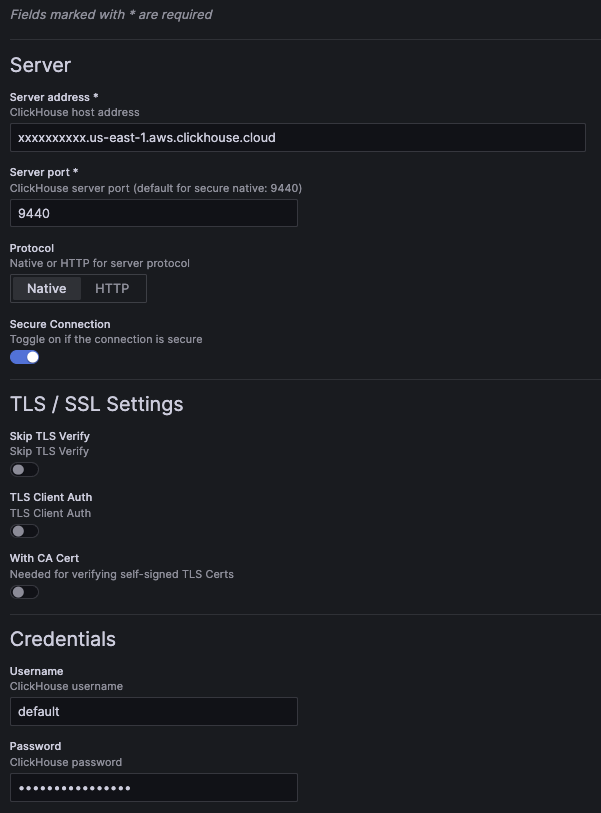
示例配置界面:
常用设置的示例配置 YAML:
jsonData:
  host: 127.0.0.1 # (required) server address.
  port: 9000      # (required) server port. For native, defaults to 9440 secure and 9000 insecure. For HTTP, defaults to 8443 secure and 8123 insecure.

  protocol: native # (required) the protocol used for the connection. Can be set to "native" or "http".
  secure: false    # set to true if the connection is secure.

  username: default # the username used for authentication.

  tlsSkipVerify:     <boolean> # skips TLS verification when set to true.
  tlsAuth:           <boolean> # set to true to enable TLS client authentication.
  tlsAuthWithCACert: <boolean> # set to true if CA certificate is provided. Required for verifying self-signed TLS certificates.

secureJsonData:
  password: secureExamplePassword # the password used for authentication.

  tlsCACert:     <string> # TLS CA certificate
  tlsClientCert: <string> # TLS client certificate
  tlsClientKey:  <string> # TLS client key
请注意,通过 UI 保存配置时会新增一个 version 属性,该属性表示保存该配置时对应的插件版本。
HTTP 协议
如果选择通过 HTTP 协议进行连接,将会显示更多配置选项。
HTTP path
如果你的 HTTP 服务器是通过不同的 URL 路径对外暴露的,可以在此处添加该路径。
jsonData:
  # excludes first slash
  path: additional/path/example
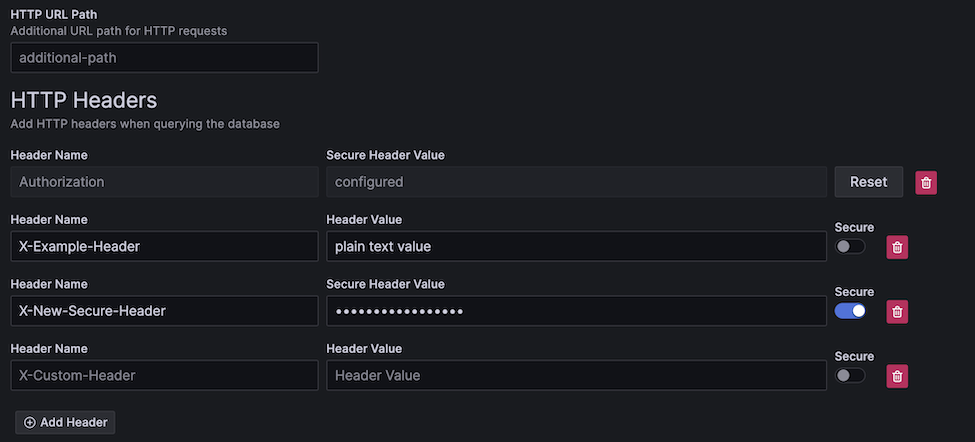
可以为发送到服务器的请求添加自定义请求头。
请求头的值可以是明文或安全类型。
所有请求头的键都会以明文形式存储,而安全请求头的值会保存在安全配置中(类似于 password 字段)。
通过 HTTP 传输的安全值
虽然安全请求头的值会安全地存储在配置中,但如果禁用安全连接,该值仍会通过 HTTP 发送。
普通/安全请求头的 YAML 示例:
jsonData:
  httpHeaders:
  - name: X-Example-Plain-Header
    value: plain text value
    secure: false
  - name: X-Example-Secure-Header
    # "value" is excluded
    secure: true
secureJsonData:
  secureHttpHeaders.X-Example-Secure-Header: secure header value
其他设置
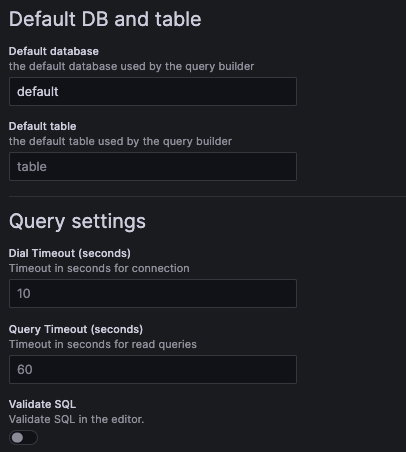
这些额外设置是可选的。
YAML 示例:
jsonData:
  defaultDatabase: default # default database loaded by the query builder. Defaults to "default".
  defaultTable: <string>   # default table loaded by the query builder.

  dialTimeout: 10    # dial timeout when connecting to the server, in seconds. Defaults to "10".
  queryTimeout: 60   # query timeout when running a query, in seconds. Defaults to 60. This requires permissions on the user, if you get a permission error try setting it to "0" to disable it.
  validateSql: false # when set to true, will validate the SQL in the SQL editor.
OpenTelemetry
OpenTelemetry (OTel) 已深度集成到该插件中。
可以使用我们的 exporter 插件 将 OpenTelemetry 数据导出到 ClickHouse。
为获得最佳效果,建议同时为 logs 和 traces 配置 OTel。
还需要配置这些默认设置以启用 data links,这是一项支持强大可观测性工作流的功能。
为了加快构建日志查询,可以为日志查询设置默认数据库/表以及默认列。这样会在查询构建器中预先填充一条可直接运行的日志查询,从而在可观测性的 Explore 页面中浏览时更加高效。
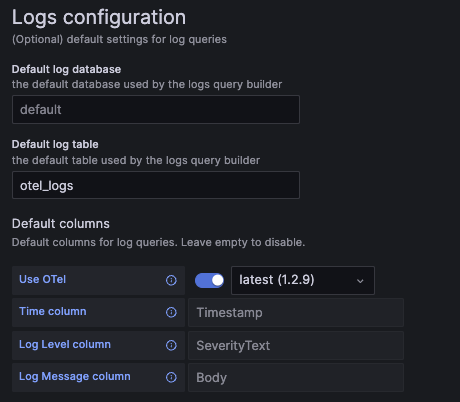
如果你使用的是 OpenTelemetry,应当启用“Use OTel”开关,并将 default log table 设置为 otel_logs。
这会自动重写默认列配置,以使用所选的 OTel schema 版本。
虽然日志并不要求依赖 OpenTelemetry,但将日志和 trace 存储在同一数据集中,有助于结合数据链接实现更顺畅的可观测性工作流。
日志配置示例界面:
日志配置 YAML 示例:
jsonData:
  logs:
    defaultDatabase: default # default log database.
    defaultTable: otel_logs  # default log table. If you're using OTel, this should be set to "otel_logs".

    otelEnabled: false  # set to true if OTel is enabled.
    otelVersion: latest # the otel collector schema version to be used. Versions are displayed in the UI, but "latest" will use latest available version in the plugin.

    # Default columns to be selected when opening a new log query. Will be ignored if OTel is enabled.
    timeColumn:       <string> # the primary time column for the log.
    levelColumn:   <string> # the log level/severity of the log. Values typically look like "INFO", "error", or "Debug".
    messageColumn: <string> # the log's message/content.
Trace(追踪)
为了加速构建追踪查询,你可以为追踪查询设置默认数据库和表,以及默认使用的列。这样会在查询构建器中预加载一条可直接运行的追踪搜索查询,从而在 Explore 页面中进行可观测性浏览时更加高效。
如果你使用的是 OpenTelemetry,应启用“Use OTel”开关,并将 default trace table 设置为 otel_traces。
这会自动重写默认列配置,以使用所选的 OTel Schema 版本。
虽然并不强制要求使用 OpenTelemetry,但在基于其 Schema 存储追踪数据时,该功能效果最佳。
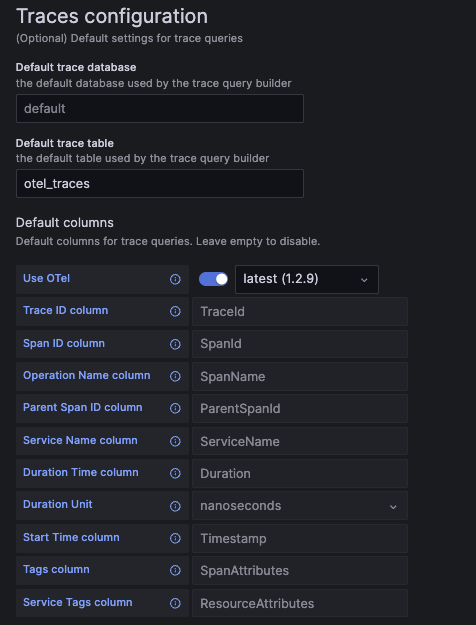
追踪配置界面示例:
追踪配置 YAML 示例:
jsonData:
  traces:
    defaultDatabase: default  # default trace database.
    defaultTable: otel_traces # default trace table. If you're using OTel, this should be set to "otel_traces".

    otelEnabled: false  # set to true if OTel is enabled.
    otelVersion: latest # the otel collector schema version to be used. Versions are displayed in the UI, but "latest" will use latest available version in the plugin.

    # Default columns to be selected when opening a new trace query. Will be ignored if OTel is enabled.
    traceIdColumn:       <string>    # trace ID column.
    spanIdColumn:        <string>    # span ID column.
    operationNameColumn: <string>    # operation name column.
    parentSpanIdColumn:  <string>    # parent span ID column.
    serviceNameColumn:   <string>    # service name column.
    durationTimeColumn:  <string>    # duration time column.
    durationUnitColumn:  <time unit> # duration time unit. Can be set to "seconds", "milliseconds", "microseconds", or "nanoseconds". For OTel the default is "nanoseconds".
    startTimeColumn:     <string>    # start time column. This is the primary time column for the trace span.
    tagsColumn:          <string>    # tags column. This is expected to be a map type.
    serviceTagsColumn:   <string>    # service tags column. This is expected to be a map type.
列别名
列别名是一种方便的方法,可以使用不同的名称和类型来查询你的数据。
通过使用别名,你可以将嵌套的 schema 展平成扁平结构,从而在 Grafana 中更轻松地进行选择。
在以下情况下,别名可能对你有用:
- 你了解自己的 schema 以及其中大部分嵌套属性和类型
- 你将数据存储在 Map 类型中
- 你将 JSON 以字符串形式存储
- 你经常对所选列应用函数来进行转换
在表中定义的 ALIAS 列
ClickHouse 内置列别名功能,并且开箱即用地支持与 Grafana 集成。
可以直接在表上定义别名列。
CREATE TABLE alias_example (
  TimestampNanos DateTime(9),
  TimestampDate ALIAS toDate(TimestampNanos)
)
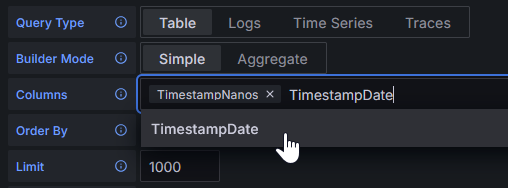
在上面的示例中,我们创建了一个名为 TimestampDate 的别名,用于将纳秒时间戳转换为 Date 类型。
这类数据不像第一列那样存储在磁盘上,而是在查询时计算得到。
表中定义的别名在执行 SELECT * 时不会返回,但可以通过服务器设置进行配置。
要了解更多信息,请阅读 ALIAS 列类型的文档。
列别名表
默认情况下,Grafana 会根据 DESC table 的响应提供列建议。
在某些情况下,你可能希望完全覆盖 Grafana 所看到的列。
在 Grafana 中选择列时,这有助于在一定程度上隐藏表结构细节,视数据表的复杂度而定,可以改善用户体验。
与在表上直接定义别名相比,这种方式的优势在于你可以轻松更新别名,而无需修改表本身。
在某些架构中,这可能会有成千上万条别名条目,进而使底层的表定义显得杂乱。
它还允许隐藏你希望用户忽略的列。
Grafana 要求别名表具有以下列结构:
CREATE TABLE aliases (
  `alias` String,  -- The name of the alias, as seen in the Grafana column selector
  `select` String, -- The SELECT syntax to use in the SQL generator
  `type` String    -- The type of the resulting column, so the plugin can modify the UI options to match the data type.
)
下面展示如何使用 alias 表来复现 ALIAS 列的行为:
CREATE TABLE example_table (
  TimestampNanos DateTime(9)
);

CREATE TABLE example_table_aliases (`alias` String, `select` String, `type` String);

INSERT INTO example_table_aliases (`alias`, `select`, `type`) VALUES
('TimestampNanos', 'TimestampNanos', 'DateTime(9)'), -- Preserve original column from table (optional)
('TimestampDate', 'toDate(TimestampNanos)', 'Date'); -- Add new column that converts TimestampNanos to a Date
然后我们就可以将此表配置为供 Grafana 使用。请注意,名称可以是任意的,甚至可以定义在单独的数据库中:
现在 Grafana 将看到别名表的结果,而不是 DESC example_table 的结果:
这两种类型的别名都可以用于执行复杂的类型转换或 JSON 字段提取。
所有 YAML 选项
以下是该插件提供的所有可用 YAML 配置选项。
有些字段包含示例值,而另一些仅展示字段的类型。
有关使用 YAML 预配置数据源的更多信息,请参阅 Grafana 文档。
datasources:
  - name: Example ClickHouse
    uid: clickhouse-example
    type: grafana-clickhouse-datasource
    jsonData:
      host: 127.0.0.1
      port: 9000
      protocol: native
      secure: false
      username: default
      tlsSkipVerify: <boolean>
      tlsAuth: <boolean>
      tlsAuthWithCACert: <boolean>
      defaultDatabase: default
      defaultTable: <string>
      dialTimeout: 10
      queryTimeout: 60
      validateSql: false
      httpHeaders:
      - name: X-Example-Plain-Header
        value: plain text value
        secure: false
      - name: X-Example-Secure-Header
        secure: true
      logs:
        defaultDatabase: default
        defaultTable: otel_logs
        otelEnabled: false
        otelVersion: latest
        timeColumn: <string>
        levelColumn: <string>
        messageColumn: <string>
      traces:
        defaultDatabase: default
        defaultTable: otel_traces
        otelEnabled: false
        otelVersion: latest
        traceIdColumn: <string>
        spanIdColumn: <string>
        operationNameColumn: <string>
        parentSpanIdColumn: <string>
        serviceNameColumn: <string>
        durationTimeColumn: <string>
        durationUnitColumn: <time unit>
        startTimeColumn: <string>
        tagsColumn: <string>
        serviceTagsColumn: <string>
    secureJsonData:
      tlsCACert:     <string>
      tlsClientCert: <string>
      tlsClientKey:  <string>
      secureHttpHeaders.X-Example-Secure-Header: secure header value